Maco B2B · on Magento 2
The B2B sales platform for wholesalers, manufacturers and distributors
A ready wholesale store connected to your ERP. Your customers order in it themselves: at their own prices, on their own payment terms, with the invoices from your ERP to hand. Your sales reps stop retyping orders from e-mails.
17 B2B features as standard · ERP integration · licence included in the rollout price
What Maco B2B is
What Maco B2B is
A set of 17 wholesale selling features on Magento 2, which we roll out together with the store and the integration with your ERP.
A ready wholesale store
Company accounts, customer prices, trade credit, quick order, quotes and the sales rep panel work from day one. In every rollout we fit them to your processes and data.
Connected to your ERP
Prices, stock, credit limits, invoices and order statuses come from the ERP through Maconnector, our middleware. An order from the store reaches the ERP without retyping.
On Magento 2, with the code in your hands
The platform runs on Magento 2 and Mage-OS. The Maco B2B licence is included in the rollout price and the code stays with you, so you develop it with us or with another team.
Who it is for
Who Maco B2B is for
Wholesalers, manufacturers and distributors who sell to companies. It works best in four situations.
01
Orders arrive by e-mail and phone
Sales reps retype them into the ERP, and the customer waits for a confirmation and calls to ask about delivery.
02
Every customer has their own prices
Individual price lists, discounts and tier prices live in the ERP, and the customer learns them from a sales rep or only on the invoice.
03
You sell on payment terms
Credit limits and overdue items are watched by accounting, and the customer learns about a block only when ordering.
04
You have an ERP and want to keep it
Comarch ERP XL or Optima, enova365, SAP S/4HANA, Microsoft Dynamics 365. The store works on its data.
Prices and catalogue
Every customer sees their own price
The price from their company’s price list, tier prices and the customer’s own product codes.
They type pieces, cartons or pallets, and the store rounds up to a full pack.
- Individual price lists from the ERP
- Units of measure and order minimums
- Datasheets and certificates on the product

Ordering
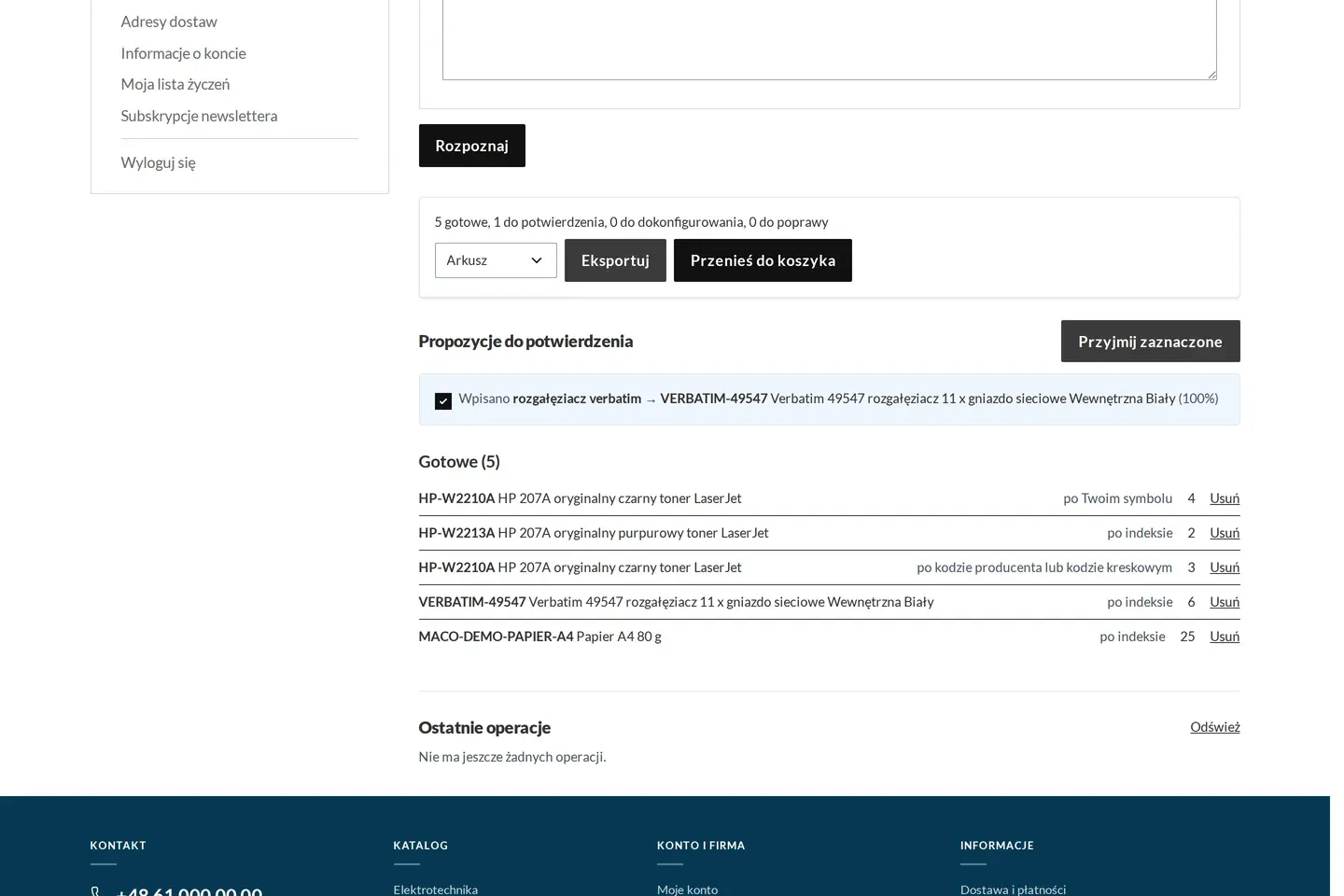
An order from a pasted list
The customer pastes a list from an e-mail or uploads a spreadsheet. The store recognises your codes, the customer’s own codes and barcodes.
Lines it is not sure about are shown for confirmation, and the rest go to the cart.
- Quick order from a list or a spreadsheet
- A separate cart for every site or job
- Repeat an order from the history
Quotes
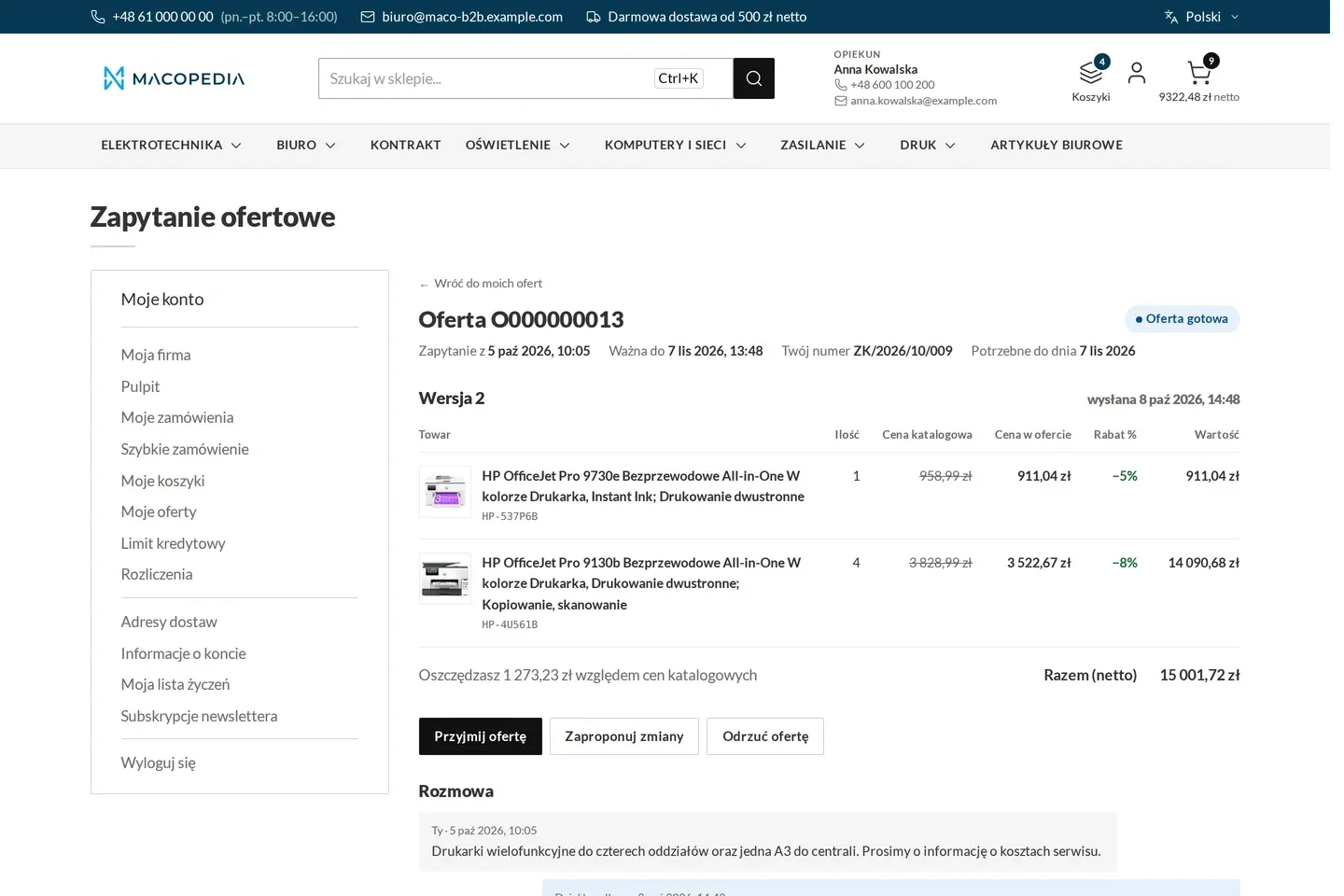
Price negotiation in the store
The customer asks for a better price from the cart or the product page. The account manager answers in the panel with a new version of the quote.
A discount above the rep’s threshold is approved by the manager, and an accepted quote turns into an order.
- Quote versions and counter-proposals
- Approval of discounts above a threshold
- One number from request to order
Payments
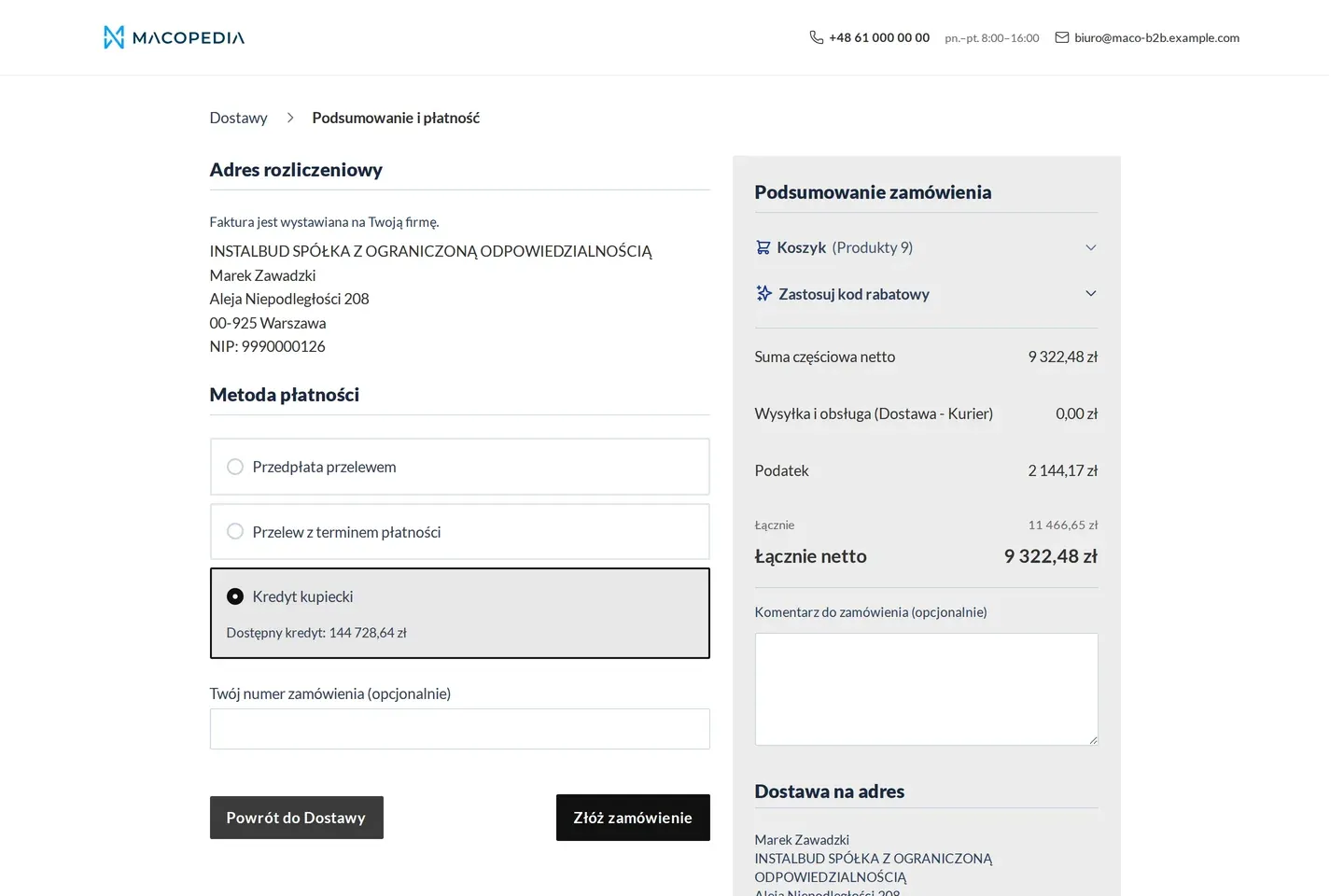
Payment terms and trade credit at checkout
Every company’s payment term and credit limit come from the ERP.
Before placing the order the customer sees how much credit is left and enters their own purchase order number.
- A payment term for every customer
- Credit limit from the ERP
- PayU, Przelewy24 and Tpay gateways
Settlements
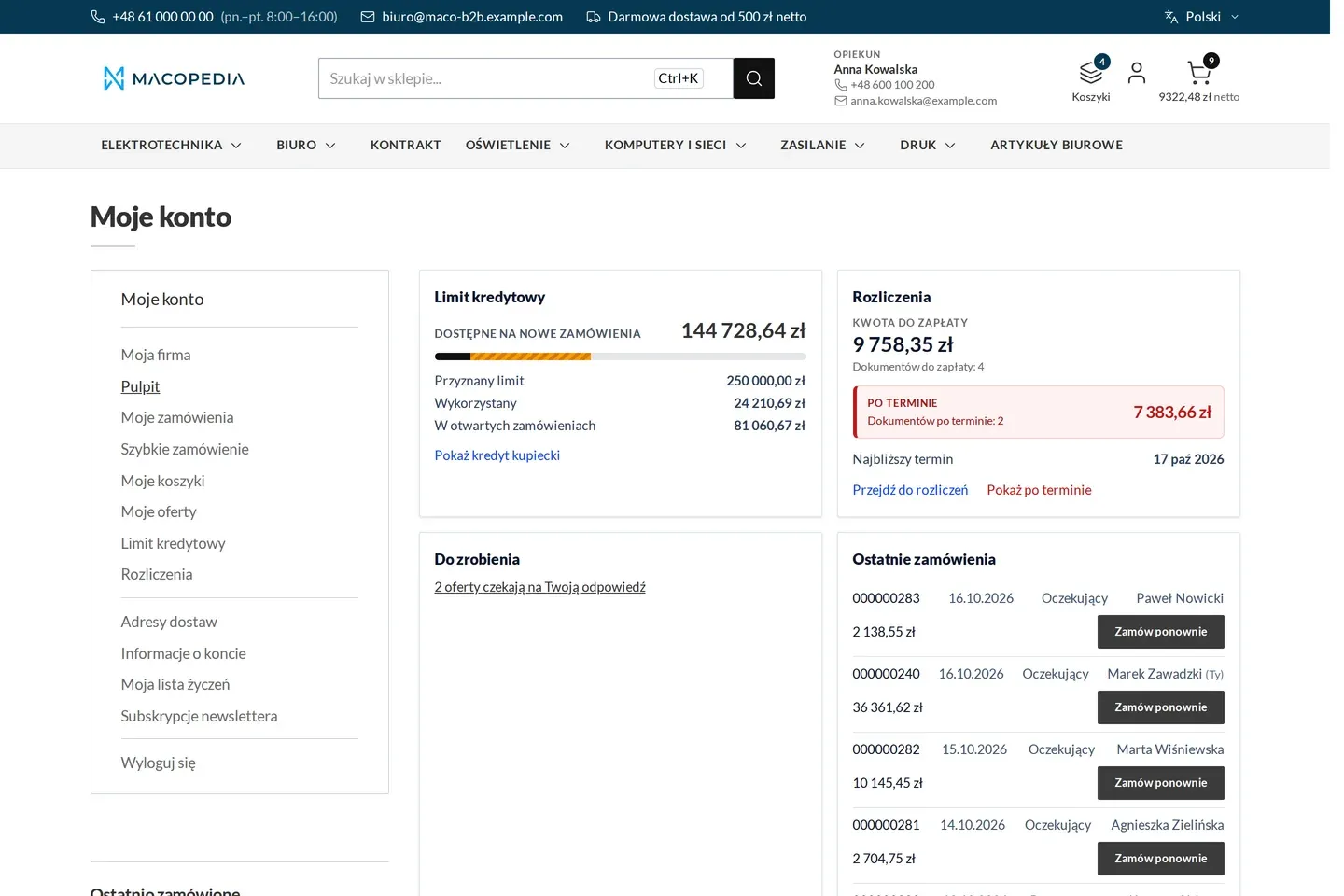
Invoices and overdue items on the customer’s dashboard
After signing in the customer sees the amount to pay, the overdue documents and the available limit.
Invoices from the ERP, with the KSeF number and a QR code, sit on the orders.
- Invoices and corrections from the ERP
- Settlements and overdue documents
- Delivery notes on the order
Sales rep panel
The sales rep sees their customers and their requests
The account manager’s panel holds their portfolio: customers, their orders, quotes to price and finances.
They can place an order on the customer’s behalf, at the customer’s price, and hand the portfolio to a stand-in for a holiday.
- The account manager’s portfolio
- A queue of requests to price
- Ordering on the customer’s behalf
Features in the standard
Every feature of Maco B2B, no tiers
We do not split the platform into Starter, Standard and Premium, because the features stand on one another. Each has its own page with a description, a worked example from a wholesaler and questions. Pick a role to see which features are its everyday tools.
Show features for a role 17
- Company and accessCompany accountsA company with employees, roles, branches and a spending threshold per order.
- Company and accessB2B registrationCompany sign-up with the tax ID checked in the national register and linked to the ERP record.
- Prices and financeTrade creditLimit and balance from the ERP, buying against the limit and a block once it is exceeded.
- Prices and financeContract pricingThe price agreed with a customer, read live, beside customer-group prices.
- OrderingQuick orderAn order from a list of codes, pasted or uploaded from a spreadsheet, recognised in seconds.
- OrderingMultiple cartsNamed carts per branch or project, handed to a colleague and printed with prices.
- OrderingReorderA whole past order again in one click, at current prices.
- OrderingQuotingA request for quote, negotiation in rounds and a quote that turns itself into an order.
- Service and settlementsCustomer dashboardThe company account at a glance: credit, things to do, orders, settlements and the account manager.
- Prices and financeB2B paymentsPayment methods per customer group, terms of 7 to 60 days and payment against the limit.
- Product and logisticsB2B shippingCost by transport class, an order split by availability and tracking from the ERP.
- Product and logisticsOrder minimumsMinimum and multiple quantities per group and company, corrected as you type.
- Product and logisticsUnits of measurePieces, cartons and pallets with conversion factors and EAN codes from the ERP, on the product page and in the cart.
- Product and logisticsProduct attachmentsDatasheets, certificates and CAD files on the product, with control over who sees them.
- Service and settlementsInvoices and settlementsInvoices, corrections and delivery notes from the ERP on the orders, with the KSeF number and the balance.
- Company and accessTwo-factor sign-inA second factor for customer accounts: an authenticator app or a code by e-mail.
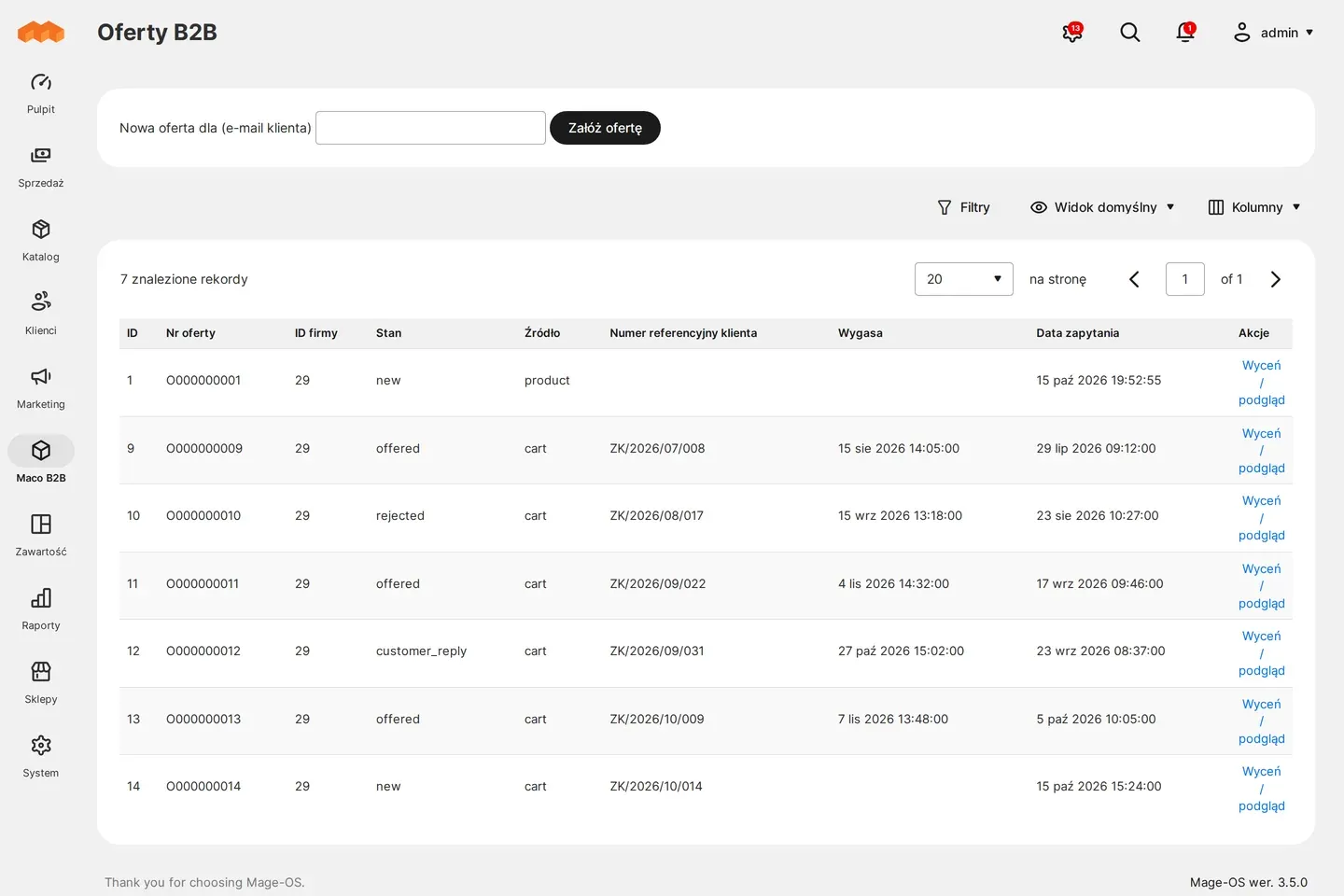
- Service and settlementsSales rep panelA sales rep’s own portfolio of customers, their orders and quotes, ordering on a customer’s behalf.
Integrations
The ERP systems we connect Maco B2B to
The exchange is run by Maconnector, our middleware: products, stock, prices, customers, orders, statuses and invoices, both ways.
- Comarch ERP XL
- Comarch ERP Optima
- enova365
- SAP S/4HANA
- Microsoft Dynamics 365
- Baselinker
- Akeneo PIM
- Pimcore
Cost and time
What a rollout costs and how long it takes
Licence included in the rollout
The Maco B2B licence is included in the rollout price. Its cost does not grow with the store’s turnover.
The integration sets the price
The cost depends most on the scope of ERP data and the extensions you choose. You get the quote after the pre-implementation analysis.
About twelve weeks
That is the reference for starting wholesale sales in the package variant. Preparing the ERP data usually takes longest.
Rollout
Six steps from analysis to the start of selling
Every step ends in something that can be signed off. The longest part of the project is usually not the platform itself but getting the ERP data into a state you can sell on.
Scope and data
01 Pre-implementation analysis
We map the wholesale sales processes, pick the extensions and write down the data the ERP has to supply. That document decides the timeline.
Repeatable set
02 Baseline configuration
We apply a repeatable set of settings: order statuses, catalogue and price visibility mode, the privacy notice and the retention policy for the rollout.
Data exchange
03 ERP integration
Maconnector exchanges products, stock, prices, balances, invoices and order statuses. A repeated message never creates a second record, because writes go by tax ID, code or invoice number.
Build
04 Platform and store
We configure Maco B2B and the chosen extensions, together with the Hyvä storefront in your company’s identity.
Acceptance
05 Acceptance testing
Acceptance scenarios on the client data, with the people who will work in the platform: buyer, company administrator, account manager, customer service.
After launch
06 Launch and beyond
After go-live we add extensions and further integrations. Maco B2B keeps compatibility with the latest stable Mage-OS release.
Extensions
Added on request
Quoted separately, because each answers a need not every wholesaler has. The scope of the standard stays fixed.
- Order approval
- File area
- Sales rep mobile app
- Returns and claims
- Notifications
- B2B analytics
- Promotions and segments
- Partner feeds
- Home page per group
- GDPR and consents
Technical information for the IT team
Architecture, the data flow through Maconnector, the ERP systems we connect the platform to, and the comparison with closed SaaS. A separate page for the person who will run it.
Macopedia in numbers
- 2012
- delivering e-commerce since
- 100+
- projects delivered
- 50+
- e-commerce clients
- 40+
- specialists on the team
What our clients say
Read what our clients say
We've already had several large projects with external vendors, but the cooperation on Apteline with Macopedia was by far the best. The Macopedia team showed us what SCRUM really is and how to apply it in practice.
 Project Director
Macopedia offers the highest quality of its services, meets customer expectations, demonstrates innovative solutions and provides specialized advice of high business value. The professionalism of Macopedia's employees makes them quickly gain the trust of their clients. We are happy to recommend cooperation with this company to others, ourselves looking forward to maintaining business relations in the future.
 E-commerce Manager
Any client who is serious about their project will find Macopedia a good partner.
 Digital Marketing Manager
They are led by a very impressive technology management and a team of experienced developers who are very focused and knowledgeable. I was also impressed by their use of agile methodology and focus during Scrum Sprints.
 eMarketing Manager
For almost a year I have been working with Macopedia on the MultiSport Zone (www.kartamultisport.pl). This is a very important project for us, as it is the first channel through which we have a chance to reach MultiSport card users directly. As a result, we depend on a comprehensive service and a reliable business partner.
 Product Owner
FAQ
Questions we get about Maco B2B
What is Maco B2B?
Does Magento not have B2B features natively?
How does Maco B2B differ from Adobe Commerce B2B?
Does my sales rep get their own panel?
Do I pay separately for a licence?
Does Maco B2B work with Hyvä?
Is everything available through the API?
Which ERP systems do you integrate with?
How long does a rollout take?
Does the store issue invoices to the national e-invoicing system?
Can I take only part of the features?
Can the whole store sit behind a login?
Book a Maco B2B demo on data from your sales
The demo takes under an hour and we run it on a customer with a credit limit, an individual price and an order from a list. Afterwards you know what you get at once and what needs data from your ERP.
Demo request
Tell us what you sell and which system holds your customer records. We answer within one business day.
Thank you for your message
We will be in touch shortly and work out the next move together.
What happens next?
A reply within one business day
Needs analysis and a project estimate
Pre-implementation analysis and consulting
Our experts run the project, so you can focus on your business

Prefer to talk?
Beata Drozdowicz
Lead Project Manager
Call or email us. We reply within one business day.